
Noah Profit Phones – Profit Phones
$297.00 Original price was: $297.00.$40.00Current price is: $40.00.
- 24/7 Contact Support & Telegram - Ecomkevin_1
- You Can Request Any Courses
- Original Courses HD Qualite and links updated
Guaranteed Safe Checkout

Description
Noah Profit Phones – Profit Phones
Build a More Organized Phone-Based Content Publishing Workflow
Managing multiple social media accounts can become difficult when every phone, video, and publishing task needs to be handled separately. Noah Profit Phones – Profit Phones focuses on making this process more organized through a centralized phone management and content publishing system.
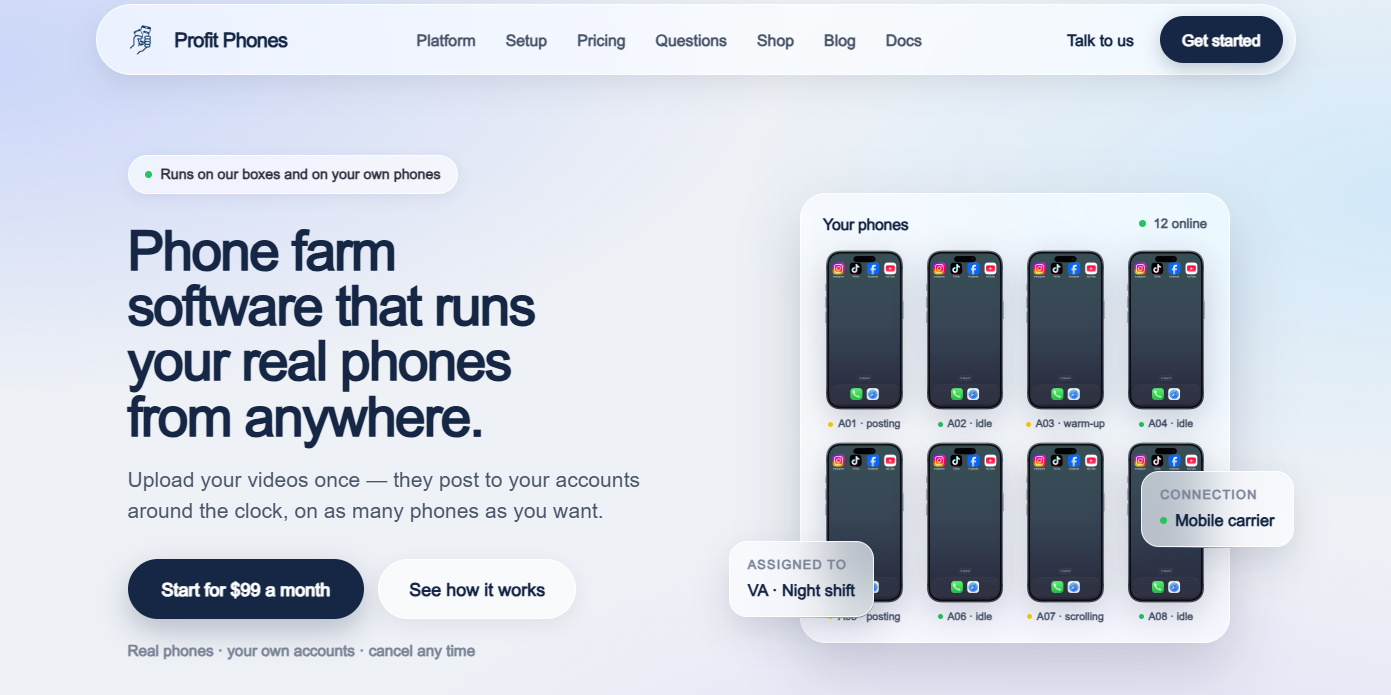
Profit Phones is designed around the idea of managing multiple real mobile devices from one place. Instead of switching between phones throughout the day, users can organize content, coordinate accounts, and oversee publishing activity through a central dashboard.
For creators and businesses exploring phone farming, social media automation, or multi-account content distribution, this platform introduces a structured approach to managing a larger publishing operation.
What Is Noah Profit Phones?
Noah Profit Phones is a phone farm management platform focused on coordinating multiple real phones and social media accounts. It brings important operational tasks together in one interface.
The platform is designed to help users organize video content, manage connected devices, schedule publishing activity, and monitor account performance. It also includes remote phone-screen access and options for coordinating assistants.
Rather than treating every device as a separate workstation, Profit Phones aims to create a more centralized workflow. This can be useful when several accounts need regular content updates and multiple devices are involved.
The system is intended for people who want to understand and manage phone-based content distribution more efficiently. However, results depend on the quality of the content, the platforms being used, and how consistently the workflow is managed.
How Profit Phones Approaches Content Publishing
A multi-account publishing operation involves more than simply uploading videos. Content needs to be organized, assigned to the right accounts, and published at suitable times. Devices also need to be monitored.
Profit Phones brings these activities into a shared management environment. This can reduce repetitive handling and make it easier to oversee a growing collection of phones.
1. Centralized Video Organization
The platform includes a centralized video library. Users can upload video files and organize them for use across connected accounts and devices.
This approach can reduce repeated file transfers. It also gives users one place to manage the content they plan to publish.
A well-organized video library can make a difference when several accounts use different clips or publishing schedules. In addition, keeping content organized can help teams understand which videos are ready to use.
2. Publishing Schedules and Account Selection
Profit Phones is designed to let users select accounts for particular videos and organize how frequently content should be published.
Planning publishing activity in advance can make daily operations easier to manage. Instead of manually handling every post, users can configure publishing instructions and oversee the scheduled workflow.
This is especially relevant for people managing multiple social media profiles. Nevertheless, users should always follow the rules and automation policies of each social media platform.
3. Management of Multiple Real Phones
A central part of the Profit Phones approach is its use of real physical phones.
The platform is designed to bring connected devices into one management interface. This can help users oversee multiple phones without constantly switching between them.
Managing devices from a central location may also make it easier to understand the overall setup. Users can keep track of the phones involved in their publishing workflow and coordinate operations more clearly.
4. Account Performance Monitoring
Profit Phones includes account performance tracking. The available dashboard information includes follower and view figures across connected accounts.
Having these figures together can make performance reviews more convenient. Users can compare account activity without opening every social media application individually.
For example, creators can review which accounts are gaining followers and which videos are receiving views. They can then use those observations to guide future content planning.
Performance data should be treated as a guide, not a promise of future growth. Social media results can change based on content quality, audience interest, platform recommendations, and other factors.
5. Remote Phone-Screen Access
The platform also provides a way to view connected phone screens remotely.
This feature can be helpful when a device needs attention. For instance, a user may want to inspect a phone when an upload appears stuck or when a device requires troubleshooting.
Remote viewing can make it easier to check what is happening without physically handling every phone. As a result, users can oversee their device setup from a more convenient location.
6. Assistant and Team Coordination
Managing multiple accounts may involve more than one person. Profit Phones includes assistant management features that allow users to invite assistants and assign access to specific phones.
This can help divide responsibilities across a team. It also provides a more organized way to manage access to connected devices.
For people operating a larger content workflow, assigning tasks can make daily responsibilities clearer. However, access should be provided carefully, and team members should understand the responsibilities assigned to them.
What You Can Expect to Learn and Explore
Profit Phones is focused on the operational side of phone-based content publishing. Its described features provide a starting point for understanding how a multi-device workflow can be organized.
Depending on the material and access included with your purchase, the platform’s approach may help you explore areas such as:
- Understanding the concept of phone farming and multi-device content operations.
- Organizing video files in a centralized content library.
- Coordinating videos across multiple social media accounts.
- Planning publishing activity and schedules.
- Managing connected physical phones from one dashboard.
- Reviewing account activity through available performance information.
- Checking connected devices through remote screen viewing.
- Organizing assistant access and team responsibilities.
- Creating a more consistent process for recurring content tasks.
These areas describe the platform’s stated functionality. They should not be interpreted as a guarantee of followers, views, revenue, or business results.
Who Is Profit Phones Suitable For?
Noah Profit Phones may be relevant to people who already create social media content or are interested in managing several accounts.
Social media creators: Creators who publish regularly may find centralized video organization and publishing coordination useful.
Multi-account operators: People managing multiple profiles can explore a more structured way to coordinate their devices and content.
Content marketing teams: Small teams may benefit from clearer device assignments and assistant access.
Digital entrepreneurs: Entrepreneurs exploring phone-based content operations can learn about the workflow behind managing multiple real devices.
Automation enthusiasts: People interested in reducing repetitive publishing tasks may want to explore the platform’s centralized management approach.
It may be less suitable for someone looking for guaranteed income, instant social media growth, or a completely hands-off business. Successful content operations still require planning, original content, regular review, and responsible platform use.
Key Benefits of the Profit Phones Approach
A More Centralized Workflow
Managing videos, accounts, phones, and team members in one place can reduce the need to move between separate tools.
Less Repetitive File Handling
A shared video library can make content easier to organize. It may also reduce repeated transfers between devices.
Better Visibility Across Devices
A central interface can help users oversee connected phones and understand the status of their setup.
More Convenient Performance Reviews
Viewing follower and video information together can make it easier to review account activity.
Remote Device Checks
Remote screen viewing provides another way to inspect connected phones when troubleshooting is needed.
More Structured Team Access
Assistant assignments can help divide responsibilities and limit access to the devices each person needs.
Support for Larger Workflows
The platform is described as being designed for operations ranging from a small group of accounts to larger multi-account setups. The practical capacity of any setup will depend on its devices, configuration, and platform requirements.
Why Content Quality Still Matters
Automation and device management can help organize repetitive tasks. However, they cannot replace a good content strategy.
Social media growth depends on creating content that people want to watch and share. Therefore, users should focus on understanding their audience, choosing relevant topics, and improving their videos over time.
It is also important to respect the rules of each social media platform. Avoid spam, misleading engagement, unauthorized account activity, or automation that violates platform policies.
A well-managed workflow should support genuine content creation. It should not be treated as a shortcut to guaranteed reach or income.
Frequently Asked Questions
What is Noah Profit Phones?
Noah Profit Phones, also known as Profit Phones, is a phone farm management platform. It is designed to help users coordinate multiple real phones, organize videos, manage social media accounts, and oversee publishing activity from a central dashboard.
What is phone farming?
Phone farming generally refers to operating multiple mobile devices for coordinated digital tasks. In the context of Profit Phones, the focus is on organizing real phones for social media content publishing and account management.
Does Profit Phones work with real phones?
The platform is described as being built around connected physical phones rather than phone emulators. Check the current compatibility information before setting up your devices.
Can I manage multiple social media accounts?
Profit Phones is designed for multi-account workflows. It provides tools for organizing videos and coordinating publishing across connected accounts. The exact supported platforms and account limits should be confirmed before purchase.
Does Profit Phones include scheduling features?
The platform description includes the ability to organize publishing schedules and configure how frequently content should be posted. Available scheduling options may depend on the current version and configuration.
Can I monitor account performance?
The described dashboard includes follower and view information for connected accounts. This can help users review account activity in one place.
Can I access my phones remotely?
Profit Phones includes remote phone-screen viewing. This allows users to inspect a connected device’s screen without needing to handle the phone physically.
Can I give assistants access?
The platform description includes assistant management. Users can invite assistants and assign access to specific phones, helping divide operational responsibilities.
Does Profit Phones guarantee social media growth or income?
No. Software cannot guarantee views, followers, engagement, or earnings. Results depend on content quality, audience response, platform rules, and the user’s implementation.
Is Profit Phones suitable for beginners?
People who are new to multi-device content operations may find the concept useful to explore. However, managing multiple phones and social media accounts can involve technical setup and ongoing work. Beginners should review the available training and compatibility details before getting started.
Get Started with a More Organized Content Workflow
Managing multiple social media accounts does not have to mean handling every phone and video separately. Noah Profit Phones – Profit Phones brings together video organization, device coordination, publishing schedules, performance monitoring, and team access in one management approach.
If you are exploring phone farming or looking for a more structured way to manage a multi-account content operation, Profit Phones is worth learning about. Focus on building a reliable workflow, publishing useful content, and reviewing performance consistently.
Choose a setup that fits your needs, follow the rules of the platforms you use, and treat automation as a tool to support your content strategy.
Reviews
There are no reviews yet.